

A domain on a watchlist expires in 12 days. A beginner sees the date and plans to register it the next morning. The current owner renews it two weeks later, and the domain never reaches the open market.
Nothing went wrong.
The date was read as a release date. In reality, a domain expiration date marks the end of the current paid registration term. Grace periods, registrar policies, auctions, redemption, and pending delete may still stand between that date and public availability.
I check expiry dates for two very different jobs: protecting domains I already control and tracking domains I may want to acquire. The same data starts both workflows, but the next actions are almost opposite.
What an expiration date actually means
A domain registration covers a fixed term. The expiration date is the scheduled end of that term if the registrant does not renew. It does not guarantee that the website will stop at midnight, that the registry will delete the name, or that another buyer can register it immediately.
Registrars often attempt auto-renewal before or around the expiration date. Some keep the domain working during a post-expiration grace window. Others change the DNS, park the name, or route it into an auction process while the original registrant still has renewal rights.
That is why I treat the expiry date as the first checkpoint in a lifecycle. Availability sits near the end.
The lifecycle after expiration
The exact timeline depends on the top-level domain, registry, registrar, and account agreement. A .com name and a country-code domain may follow different rules. I use the stages below as a map, then confirm the live policy for the specific registrar and TLD.
1. Active registration
The domain is registered and normally resolves through DNS. DNS, or the Domain Name System, connects the name to web, email, and other services. This is the safest time to renew or transfer.
2. Expiration
The paid term ends. The registrar may keep services running for a while, interrupt them, or replace the website with an expiration notice. The original registrant may still be able to renew.
For an SEO team, the operational risk starts here. Broken DNS can take the website and branded email offline. Search crawlers may receive errors, users may lose access, and outreach messages may bounce.
3. Auto-renew grace period
Many registrars offer a post-expiration renewal window. Its length and fees vary. ICANN notes that an Auto Renew Grace Period may last from 1 to 45 days when a registrar offers one, so I never assume a universal countdown.
A domain may also appear in an expired auction during this stage. A winning bid can still be canceled if the current registrant renews within the allowed window.
4. Redemption grace period
For covered generic top-level domains, ICANN requires a 30-day Redemption Grace Period after the registrar deletes the registration. The former registrant can usually restore the name through the registrar, often with a higher recovery fee.
The domain is still unavailable to a new registrant. A buyer watching the name should track its status rather than repeatedly trying to register it.
5. Pending delete
After redemption ends without restoration, a generic domain can enter pending delete. At this point, renewal and restoration are generally no longer available. The registry is preparing to release the name.
This stage is short and competitive. Drop-catching services send registration attempts as soon as the registry releases the domain. A manual registrar search is unlikely to beat established drop-catching systems for a desirable name.
6. Drop, transfer, or auction delivery
Some names drop and become available for ordinary registration. Others are captured by a backorder service, delivered through an expired-domain auction, or retained by a registrar partner. The expiration date alone cannot predict which path will occur.
Expiry date and availability are separate fields
A WHOIS or RDAP record can show an expiration date while the domain remains firmly under the current registrant’s control. RDAP is the structured registration-data protocol that now provides much of the public data once associated with WHOIS.
Status codes provide more context. Values such as clientHold, redemptionPeriod, and pendingDelete describe different points in the lifecycle. I read the status together with the expiry date, registrar, nameservers, and latest update date.
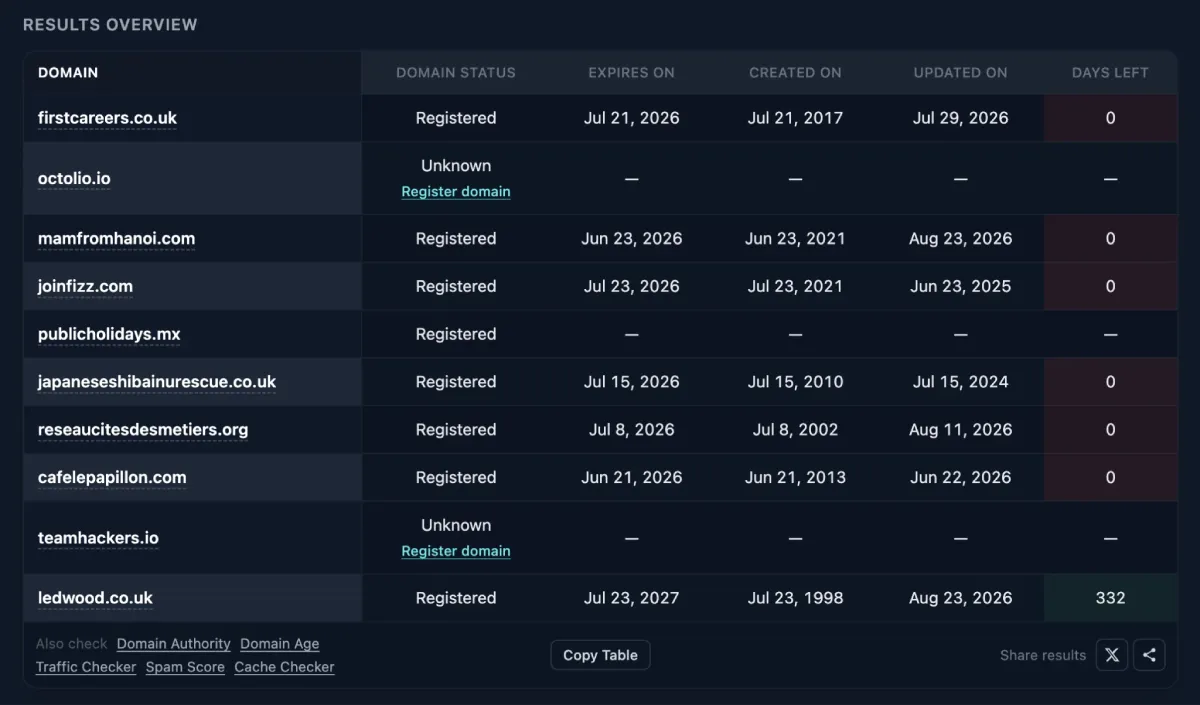
A blank expiry field is also possible. Some registries and TLDs do not publish the date publicly. Missing data means I need another source, usually the registrar account for my own domain or the registry’s official lookup for a domain I am researching.
My workflow for domains I already own
1. Check the portfolio in one pass
I use the free bulk Domain Expiry Checker to compare status, creation date, last update, expiration date, and days remaining across a working list. A side-by-side table is useful when domains sit at different registrars or belong to different client accounts.
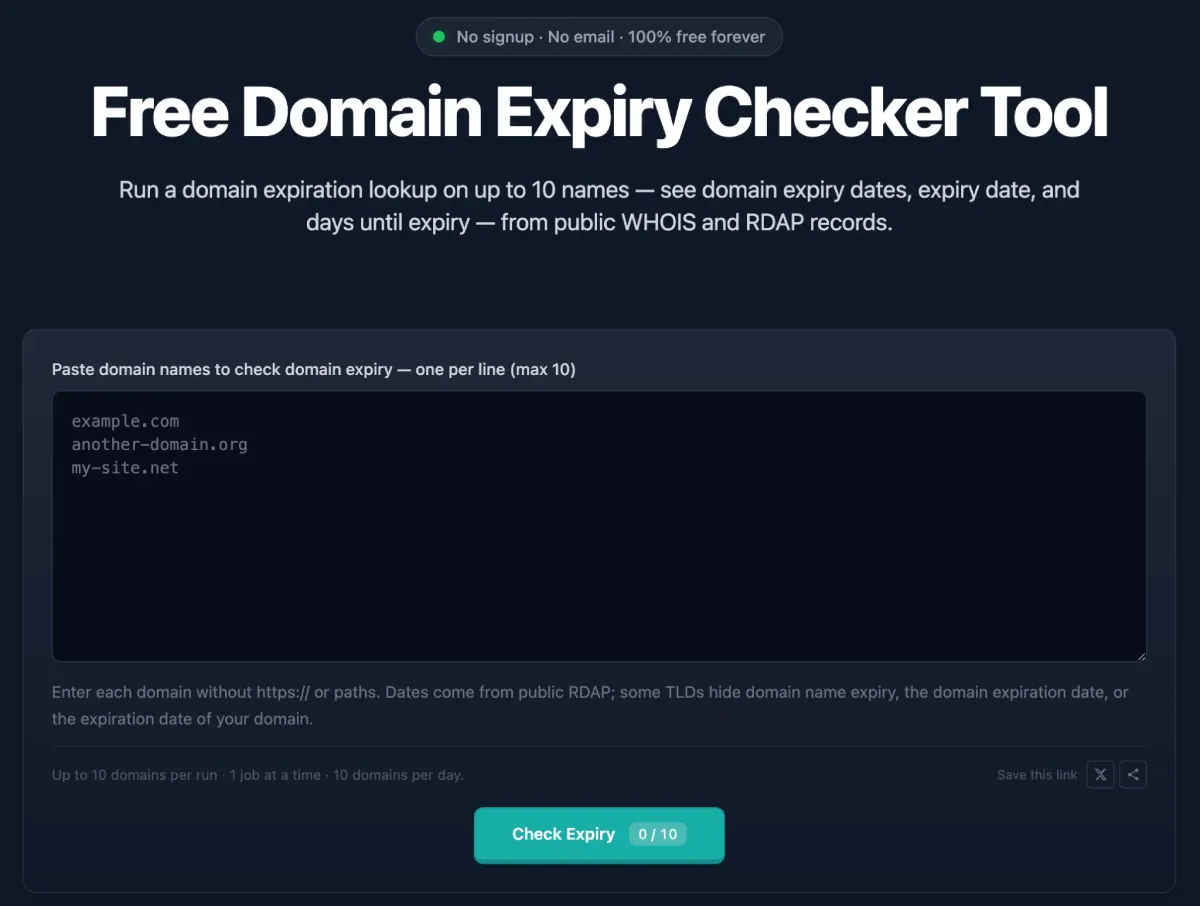
For a portfolio or watchlist that runs on a schedule, the Karma.Domains Expired Domains API and MCP can send the same expiry fields into a renewal or acquisition queue.
2. Treat public data as a cross-check
For a domain I control, the registrar dashboard is the billing source of truth. Public RDAP or WHOIS data helps catch mismatches, missing renewals, or a domain stored in an unexpected account.
3. Set an internal deadline before the registry deadline
I do not build a renewal process around the final day. The internal deadline should leave time to fix an expired card, failed payment, account lock, lost two-factor device, or outdated registrant email.
For important domains, I record an owner, registrar, account location, renewal setting, payment method, and recovery contact. A calendar reminder without an accountable owner is easy to ignore.
4. Verify the renewal
A successful payment screen is encouraging. I also confirm that the new expiration date appears in the registrar account and later in public data when the registry publishes it.
I check DNS and email after any late renewal or restoration. A domain can be renewed while cached DNS changes or registrar parking still affect service for a while.
My workflow for domains I want to acquire
1. Start monitoring before expiration
The expiry date tells me when to pay closer attention. I note the registrar because its auction and renewal process can affect where the domain appears and whether a backorder is useful.
2. Watch status changes
I track changes from active registration through any hold, redemption, or pending-delete status. A renewed expiration date ends the acquisition plan. A redemption status means the former owner still has a recovery path. Pending delete means the drop is close for many generic TLDs.
3. Research value before the buying window
The technical lifecycle can move faster than a proper SEO review. Before an auction closes or a pending-delete name drops, I inspect archived content, backlink sources, anchor text, topic changes, trademarks, and likely rebuild options.
I use the Karma.Domains database of expired domains when I need to move from a date check to full expired-domain research. An expiry timestamp tells me when ownership may change. The history tells me whether the name is worth pursuing.
4. Choose the acquisition route
If the registrar sends expired inventory to its own auction, I follow that auction. If the domain reaches pending delete, I consider a drop-catching service. If the owner renews, a direct purchase may be the only realistic route.
A backorder is a request for a service to try registering a domain when it becomes available. It is not a guarantee of delivery, and several services may compete for the same name.
Why expiration matters to SEO teams
Downtime and crawl errors
An expired domain can stop resolving or show a registrar parking page. Search engines may encounter DNS errors, server errors, or replacement content. A short incident may be recoverable, but it is an avoidable way to interrupt crawling and traffic.
Email and account recovery
Branded email often depends on the same domain. If mail fails, the team may miss customer messages, renewal notices, vendor alerts, and password-reset emails. Losing the domain can also expose old email addresses to a new registrant, which creates a serious security problem.
Client ownership confusion
Agencies frequently discover domains registered in a former employee’s personal account or controlled by an old contractor. An expiry audit should include ownership and access, even when the date is far away.
Common mistakes I avoid
- Treating the expiration date as the public release date.
- Assuming every TLD follows the same grace and deletion timeline.
- Trusting auto-renew without checking the card, account access, and renewal result.
- Bidding on an expired auction as if the current registrant can no longer renew.
- Waiting for pending delete before researching backlinks, archive history, and trademarks.
- Reading a blank public expiry field as proof that the domain has no deadline.
- Tracking dates without assigning a person responsible for renewal.
Who needs an expiry check
The check belongs in the routine of site owners, in-house SEO teams, agencies managing client domains, IT staff, domain investors, affiliate teams, and anyone monitoring expired domains for acquisition.
Owners use the date to prevent a loss. Buyers use it to begin watching a process whose outcome is still uncertain.
The line I put in the spreadsheet
Expiration is an event. Availability is an outcome.
I record the date, status, registrar, and next review point. That turns a misleading countdown into a workable plan.