
Small business automation helps entrepreneurs reclaim valuable time. On average, automation tools save business owners around 2 hours and 15 minutes every day, nearly two and a half working days that can be redirected toward more meaningful tasks.
Yet many small businesses still handle routine work manually. Tasks such as sending follow-up emails, updating spreadsheets to track inventory, or processing payments individually consume hours that could be used for strategic work.
Imagine ending the workday with an organized inbox, updated financial records, and scheduled marketing posts, all completed with minimal manual effort. Automation does more than save time; it creates space for planning, innovation, and growth. Businesses that integrate automation into their daily operations often move faster and experience fewer operational bottlenecks.
If you’re ready to spend less time on repetitive tasks and more time building your business, the right automation tools can make a noticeable difference in how your day-to-day operations run.
Automating Sales and Customer Management
Sales and customer management are among the most valuable areas for small businesses to automate. When repetitive sales tasks are automated, teams can spend more time building relationships and closing deals.
Research from McKinsey suggests that automation can increase sales team productivity by up to 30%, highlighting how powerful these systems can be for growing businesses. To maximize this efficiency, many companies are leveraging offshoring to build dedicated Sales Development Representative (SDR) teams that manage these automated workflows.
#1: Using CRM Tools to Track Leads and Interactions
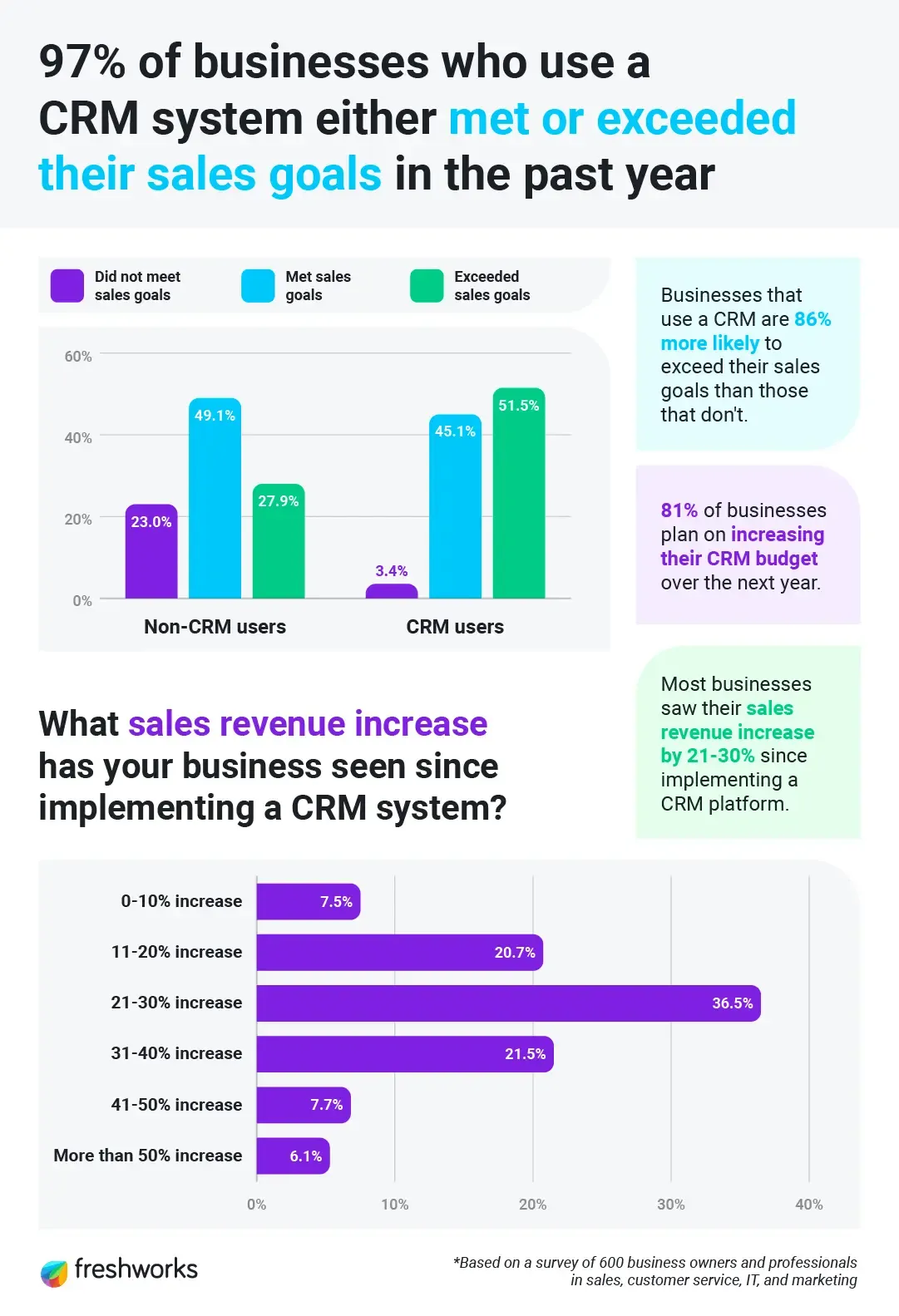
CRM software forms the backbone of sales automation. Businesses that adopt CRM platforms often see sales revenue increase by 21–30%. It serves as a central system for storing and organizing all customer information.
Instead of relying on scattered spreadsheets or notes, a CRM consolidates contact details, purchase history, communication records, and deal progress in one place. This centralized view gives teams easy access to real-time customer information, creating a single, reliable source of truth across the organization. To make this even more accessible within daily workflows, integrating CRM Outlook helps teams manage customer data and communication without switching between platforms.
Modern CRM platforms include several features designed to simplify sales processes for small businesses, such as:
- Contact and deal management with visual sales pipelines
- Email tracking that alerts teams when prospects open messages
- Built-in meeting scheduling and document sharing tools
- Integration with third-party applications to maintain smooth data flow
In addition, CRM systems help connect marketing, sales, and customer support teams by automatically syncing relevant information between them. This reduces communication gaps, removes data silos, and enables a more coordinated approach to managing customer relationships and experiences.
#2: Automated Follow-Ups and Lead Scoring
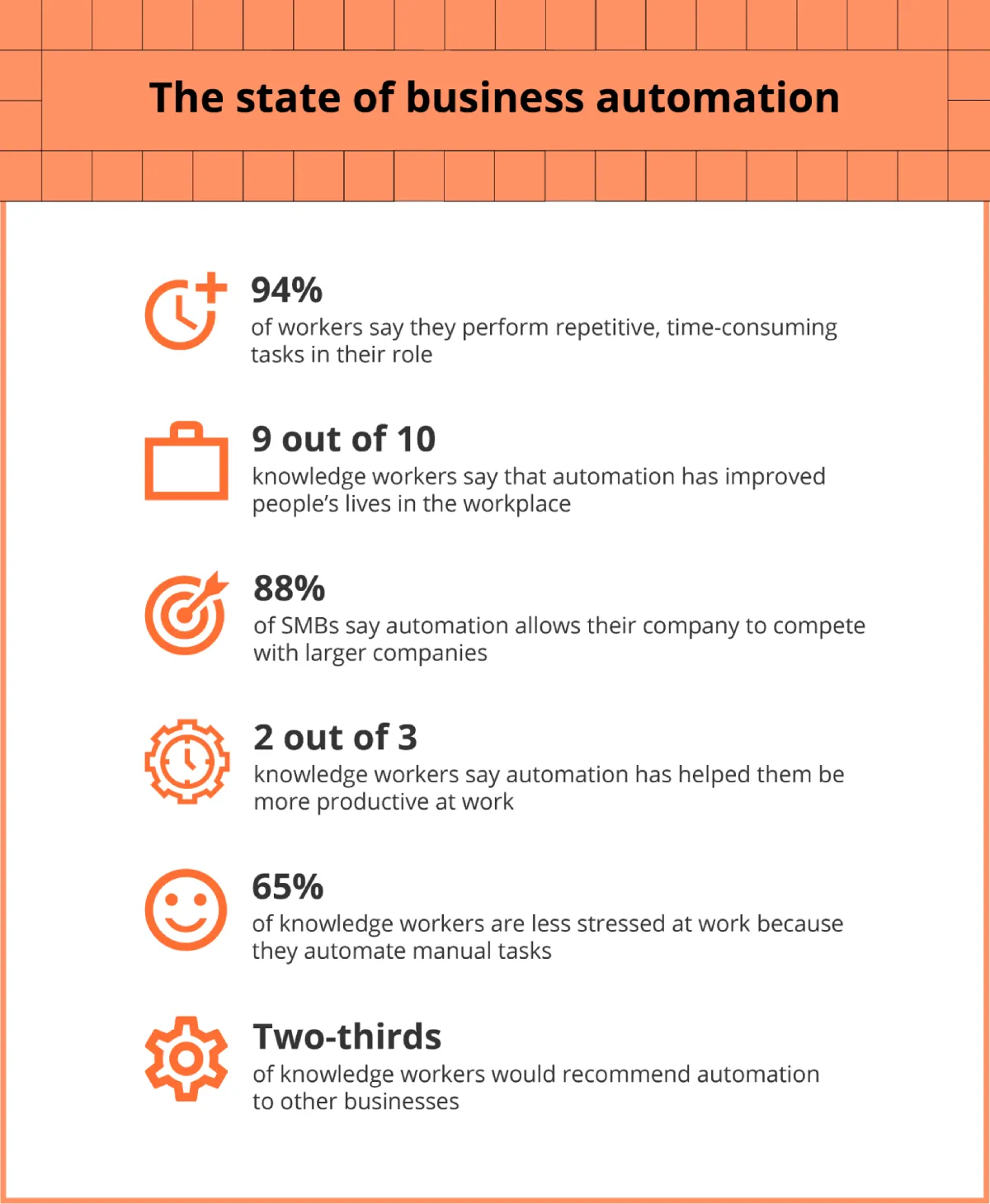
Following up with prospects manually can be time-consuming, especially when sales teams manage multiple leads at different stages. Automation helps simplify this process by triggering timely responses based on a prospect’s behavior. Two-thirds of knowledge workers say automation makes them more productive at work. Modern AI business tools further enhance this capability by analyzing engagement patterns to determine the optimal moment for a follow-up message.
For example, when someone shows interest through your website, downloads a resource, or signs up for a product demo, automated workflows can instantly send relevant information. This ensures that prospects receive useful content at the right moment, even before a sales representative reaches out. After a product demo, automated email sequences can also share additional materials that match the prospect’s interests or questions.
Another valuable feature of sales automation is lead scoring. Lead scoring helps businesses identify which prospects are most likely to convert into customers. It typically involves:
- Assigning numerical scores to leads based on actions, demographics, and engagement levels
- Prioritizing prospects who show stronger buying signals
- Automatically routing qualified leads to the appropriate sales team members
By using predictive lead scoring, sales teams can focus their time and energy on the highest-potential opportunities. Real-time notifications can also alert representatives when a prospect engages with follow-up content via email, text messages, or other channels. This allows teams to respond quickly and engage leads when their interest is strongest. With this approach, having outsourced appointment setting services ensures that high-priority leads are scheduled promptly, keeping the sales process moving efficiently.
Marketing Automation That Saves Time
Marketing automation helps small teams accomplish more without increasing workload. Many marketers report that automation frees up valuable hours that can be redirected toward planning campaigns, analyzing performance, and improving strategy. For small businesses with limited resources, these time savings often translate directly into new growth opportunities.
#3: Email Marketing Workflows
Email automation changes how businesses nurture leads and maintain customer relationships. Instead of sending individual emails manually, automated workflows deliver messages based on specific triggers or customer actions. These triggers could include subscribing to a newsletter, downloading a resource, completing a purchase, or abandoning a shopping cart.
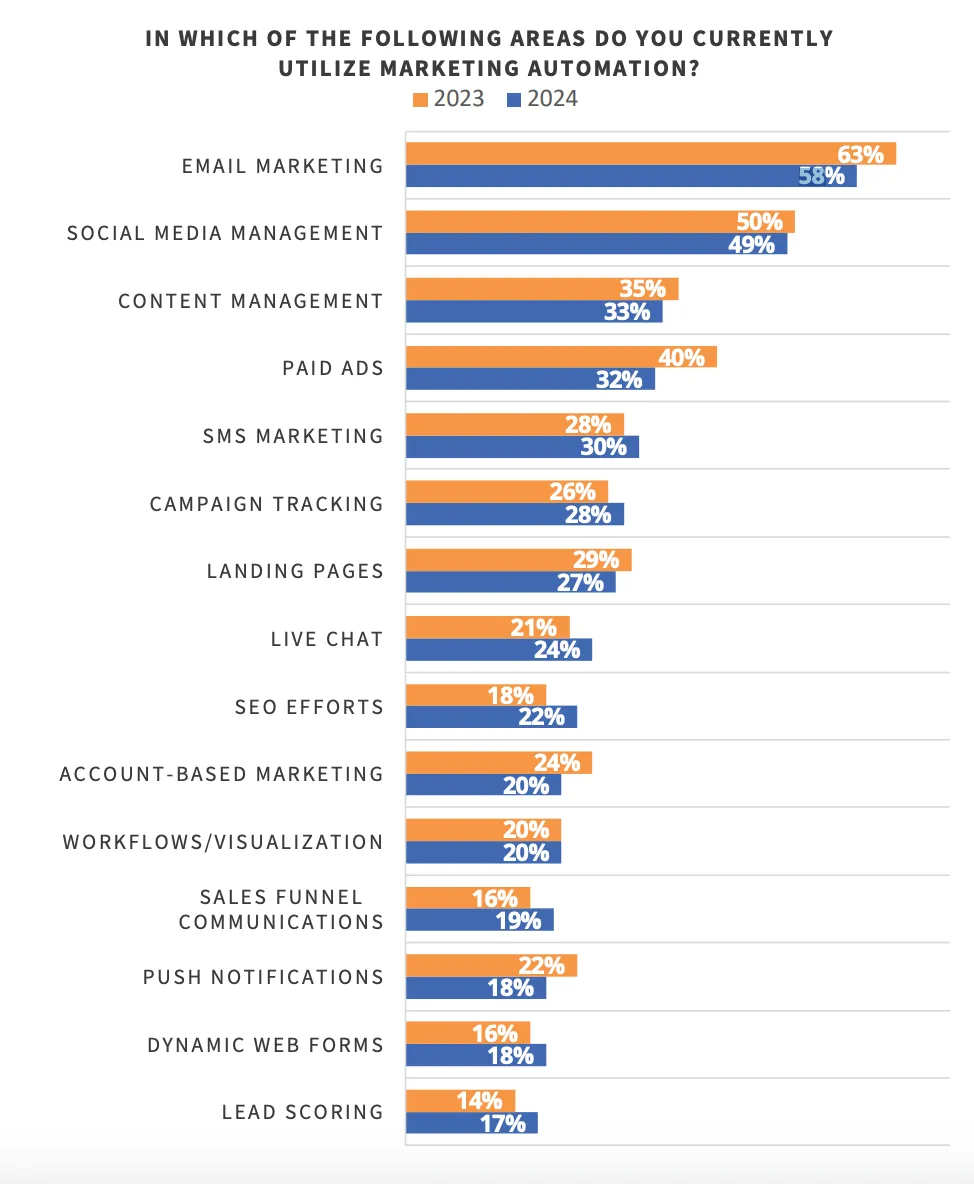
58% of marketers automate email campaigns, which makes it the most automated channel by far.
Personalized email campaigns also perform better than generic messages. Emails tailored to customer interests and behavior tend to achieve higher open rates and stronger engagement.
A simple starting point is a welcome sequence for new subscribers. From there, businesses can create more advanced workflows, such as:
- Lead nurturing sequences that guide prospects through different stages of the buying journey
- Re-engagement campaigns are designed to reconnect with inactive subscribers
- Abandoned cart reminders that encourage customers to complete unfinished purchases. Abandoned cart emails perform exceptionally well, with an open rate of 50.5%.
Once these workflows are created, they continue to operate automatically. This “set-and-run” approach allows businesses to stay connected with their audience without constant manual effort. At the same time, dynamic content features personalize messages by adjusting images, offers, and messaging based on each customer’s data and behavior.
#4: Social Media Scheduling and Engagement
Managing social media manually can quickly become time-consuming, especially for small businesses that need to stay active across multiple platforms. Social media automation tools simplify this process by allowing businesses to schedule posts in advance, publish content across multiple channels simultaneously, and maintain a consistent posting cadence.
Small teams use an AI video generator to quickly create short-form promotional content, product highlights, and social media clips without needing a full production setup.
Many platforms also include smart features that analyze audience activity and recommend the best times to publish content. This helps businesses reach their audience when engagement is highest.
In addition, unified social inboxes bring messages, comments, and mentions from different platforms into one dashboard, making it easier to respond quickly. Saved replies and automated responses can also help handle frequently asked questions without constant manual effort.
The impact of these tools can be significant. Capital University, which introduced social media automation, saw noticeable improvements within two months, 163.69% increase in TikTok engagement, 173.91% more likes, and 8.23% rise in Instagram engagement per post. These results show how consistent posting and timely interaction can strengthen audience engagement.
#5: Personalized Campaigns Using Customer Data
Personalization plays an important role in modern marketing. Automation platforms help businesses collect and analyze customer data, which can then be used to deliver more relevant messages. By segmenting audiences based on behavior, demographics, interests, or stage in the buying journey, businesses can communicate more effectively with different customer groups.
Dynamic content adds another layer of personalization. Content automation systems can adjust elements within emails or marketing messages based on customer data.
For example, product recommendations, images, or promotional offers can change depending on a customer’s previous purchases or interactions with the business. Brands are also experimenting with personalized AI marketing videos to deliver tailored messages that adapt to each customer’s preferences and stage in the buying journey.
With automation tools, even small businesses can run personalized campaigns that were once possible only for large companies with extensive marketing teams. Together with a well-structured website built by an experienced web design agency, your CRM, marketing automation, and personalization tools work seamlessly to deliver measurable growth.
In fact, research shows that organizations that apply personalization successfully often generate significantly higher revenue compared with those that rely on generic campaigns.
Automating referral programs using tools like ReferralCandy also helps businesses turn satisfied customers into consistent sources of new leads without manual follow-ups.
Streamlining Operations and Team Workflows
Many small businesses experience operational slowdowns due to inefficient task management and limited cross-team coordination. Automation helps remove these bottlenecks by organizing workflows and reducing manual effort.
When operational workflows are automated effectively, businesses can save time, improve productivity, and remain competitive as they grow. 60% of employees say they could save at least 6 hours per week if repetitive tasks were automated.

#6: Project Management and Task Automation
Project management tools with built-in automation simplify everyday tasks while keeping projects organized and on schedule. These platforms can automatically assign tasks, send deadline reminders, update project statuses, and allocate resources with minimal manual input.
77% of high-performing projects use project management software to improve coordination and efficiency.
This type of automation provides several advantages:
- Streamlined operations: Routine tasks are handled automatically, reducing delays and human error.
- Improved productivity: Employees spend less time on repetitive work and more time on strategic or creative tasks.
- Faster project completion: Automated workflows help teams move projects forward more efficiently, which is important for growing businesses.
Project management automation essentially converts scattered processes into structured and scalable systems.
For example, tools like Trello use built-in automation to automatically move task cards and assign deadlines. Similarly, platforms like Monday.com offer customizable workflows with no-code automation options that standardize repeatable processes.
Many of these tools also integrate with other business systems, allowing teams to connect project management with communication tools, customer data, and reporting platforms. This creates a more unified workflow, with information flowing smoothly across the organization.
Oliver Baker, the Managing Director of AI Development Agency, QuantumXL, says, “I see most small teams lose time not in the work, but in managing the work. At QuantumXL, we use simple project tools to automate task assignment, deadline reminders, and status updates, so the team does not spend the day chasing progress. When a task moves, the next step is triggered automatically, and everyone sees the same view of the project without extra check-ins. This removes small delays that usually add up across a project. The result is work moving faster, fewer missed steps, and a team that can focus on delivery instead of coordination.”
#7: Internal Communication Tools
In addition to project management, automated internal communication helps teams stay informed and aligned, even when they work remotely or across different time zones. Many businesses are already adopting automation and AI in internal communication to manage the growing volume of information shared within organizations.
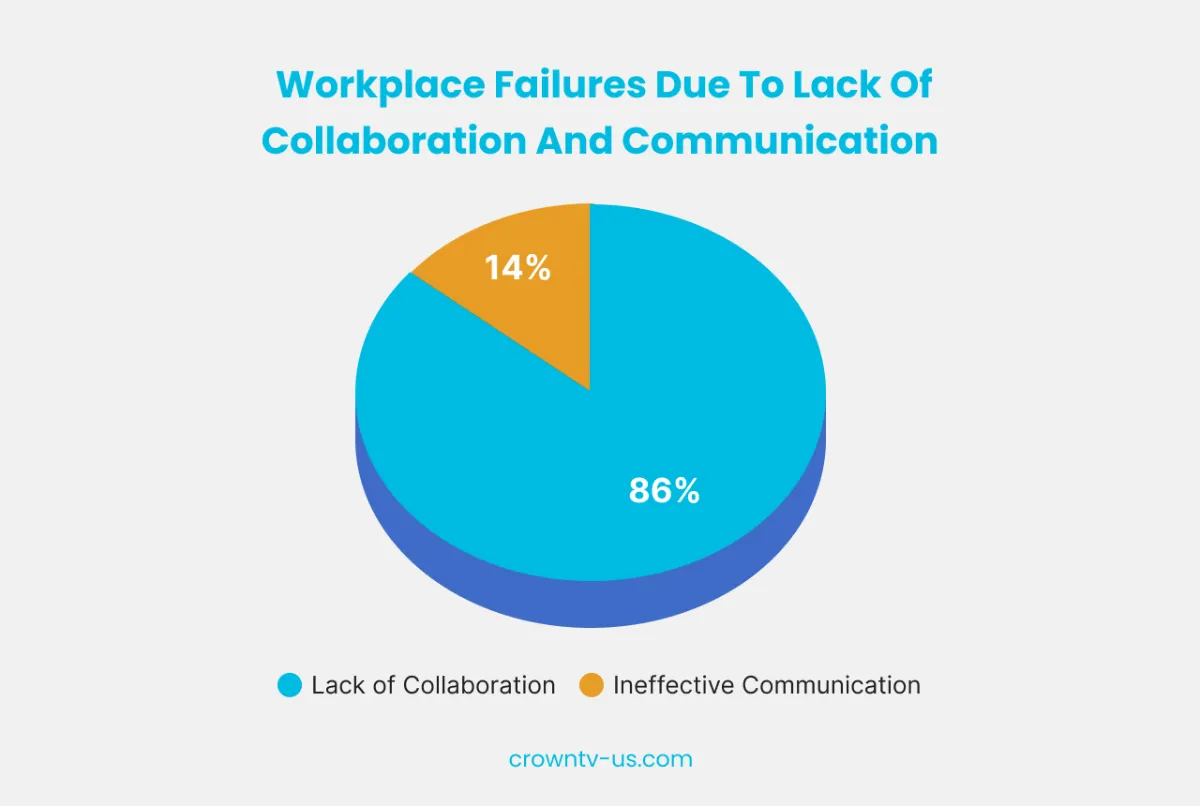
86% of employees and executives cite poor communication or collaboration as the main cause of workplace failures.
Automation tools support internal communication in several ways:
- Automated scheduling: Messages and announcements can be sent at times when employees are most likely to engage.
- Multi-channel coordination: Communication stays consistent across platforms such as email, internal portals, and messaging apps.
- Automated reminders: Notifications prompt employees to review important updates or complete required tasks.
Platforms like Slack integrate with various business applications, allowing teams to connect communication with project management, customer support, and file-sharing tools. This reduces the need to switch between multiple systems and keeps workflows organized. For teams that interact with customers, AI-powered chatbots can also handle routine questions, reducing response times and easing support staff’s workload.
Make use of no-code WhatsApp chatbot solutions that integrate with CRM and marketing tools to create seamless and automated customer journeys across sales and support.
#8: Automated Reporting and Status Updates
Creating status reports and progress updates often takes up valuable time. Automation simplifies this process by generating reports and automatically updating stakeholders.
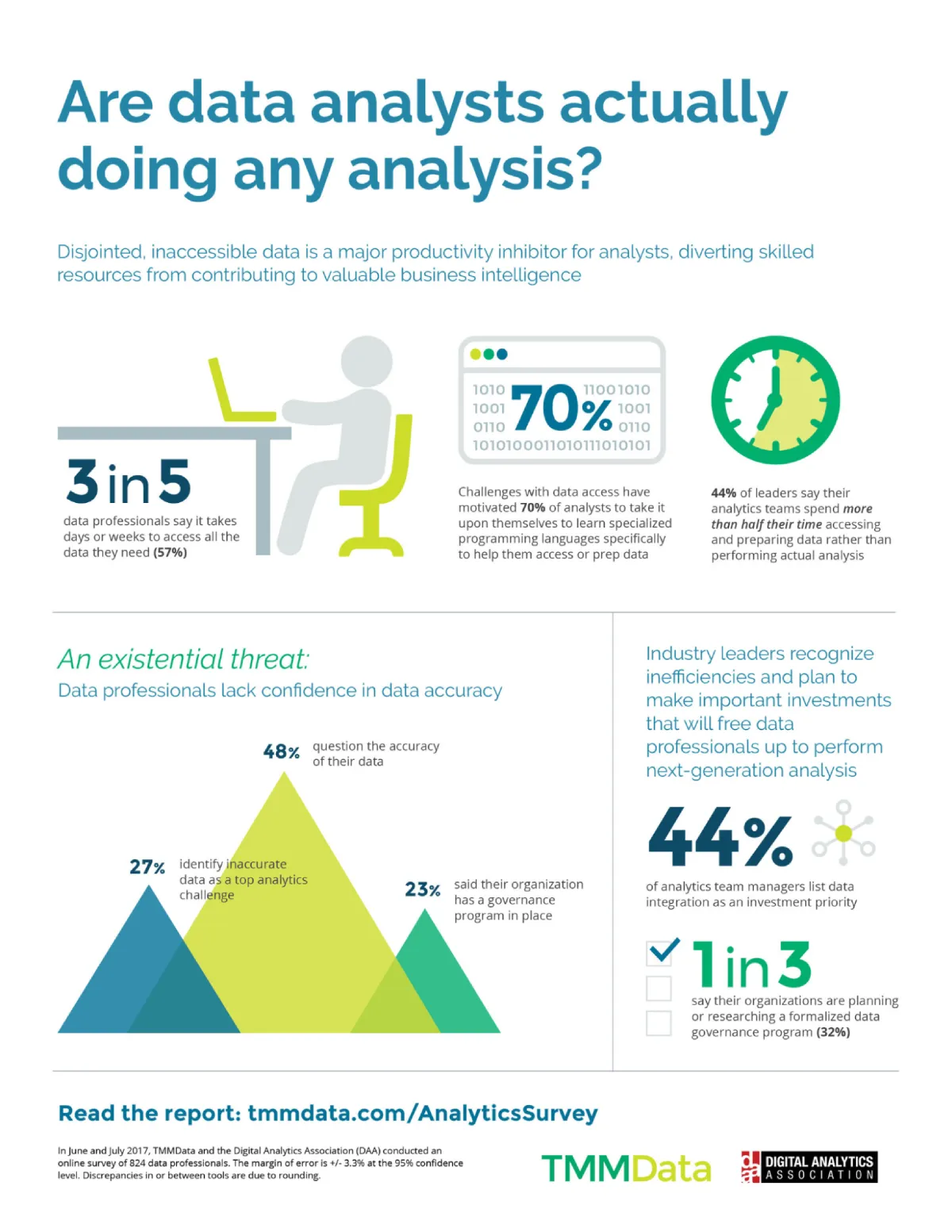
Nearly 40% of data professionals spend more than 20 hours per week on data access and preparation rather than performing actual analysis.
Automated workflows can trigger actions such as notifying team members when a project status changes, moving tasks between stages, or updating progress indicators. This ensures that everyone stays informed about project developments without needing frequent manual updates.
Key benefits of reporting automation include:
- Real-time visibility: Project status and performance metrics update instantly across connected tools.
- Automatic notifications: Stakeholders receive alerts when progress changes or milestones are reached.
- Consistent reporting: Automated systems reduce errors and ensure reports follow a standard format.
Automated reporting systems can reduce reporting preparation time by up to 80%.
To implement automated reporting, businesses first identify the reports that consume the most time, then create workflows to automatically collect and compile the necessary data. With these systems in place, teams spend less time preparing updates, meetings become more focused, and the overall quality and reliability of reporting improves.
Conclusion
Automation offers a powerful opportunity for small businesses looking to improve efficiency and support long-term growth. As we’ve explored, many affordable and user-friendly tools are now available, making automation accessible even for businesses with limited resources or technical expertise.
By introducing automation across key areas, such as sales management, marketing, operations, and finance, small business owners can reclaim valuable time each week. Systems such as CRM platforms, automated marketing workflows, and financial management tools help streamline routine tasks and lay a more organized foundation for growth.